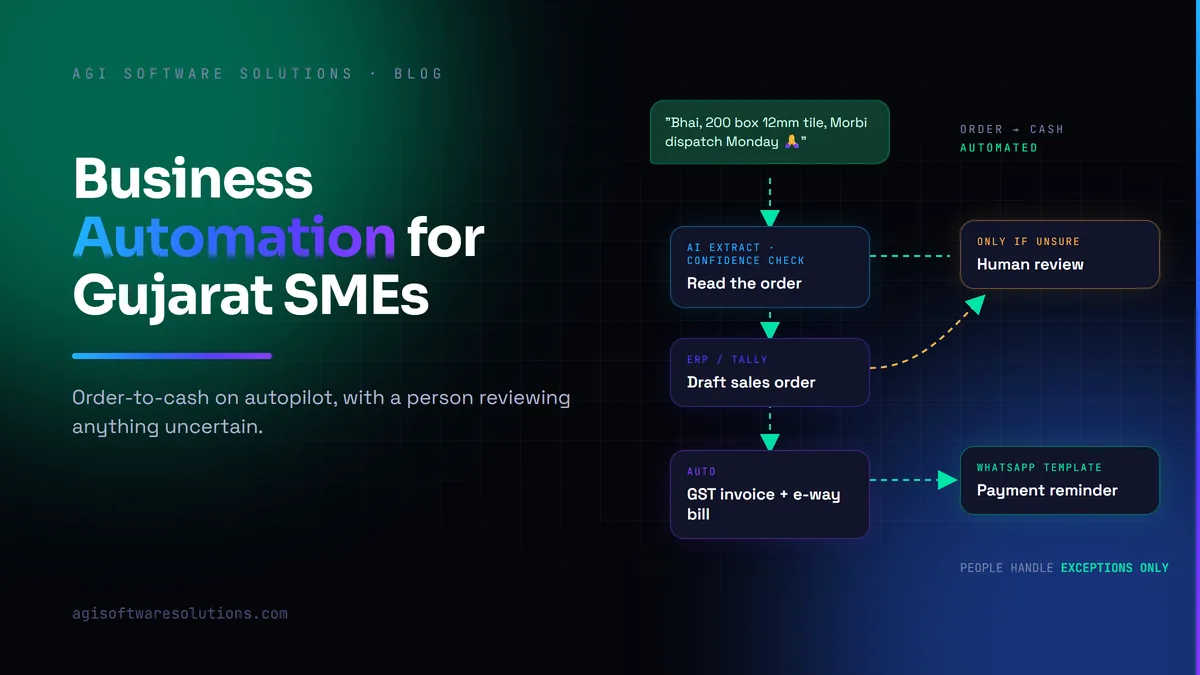
The best first automation for most Gujarat SMEs is the order-to-cash loop: capturing orders from WhatsApp and email, creating them in the ERP, invoicing and chasing payment. It touches money directly, the steps are repetitive, and the results are easy to measure. Automate the boring, high-volume steps first and keep a person reviewing anything uncertain.
Ask a business owner in Ahmedabad, Rajkot or Surat where their team's time goes, and the answer is rarely "strategy". It is copying order details from WhatsApp into Tally, chasing approvals, sending payment reminders, typing supplier invoices and building the same Excel report every Monday. Business automation takes that work off people's desks. This guide covers where to start, where AI adds value, and the mistakes that make automation projects disappointing.
What is business process automation?
Business process automation (BPA) means using software to carry out repeatable business tasks, end to end, without someone doing each step by hand. It connects the systems a business already uses, such as Tally or an ERP, a CRM, email and WhatsApp, and moves information between them according to rules. Common examples in Gujarat SMEs:
- Turning a WhatsApp or email order into a sales order in Tally or the ERP.
- Generating a GST invoice and e-way bill when goods are dispatched.
- Sending payment reminders before and after the due date.
- Routing purchase requests to the right approver by amount.
- Delivering a daily sales, stock and receivables summary to the owner's phone.
AI automation adds a step that reads unstructured inputs, such as a photographed order list or a mixed Gujarati-English message, before the rules take over.
Start with the work, not the tool
Before choosing any software, spend a week listing repetitive tasks and estimating, roughly, how many times each happens and how long it takes. A task done 40 times a day for five minutes is over three hours of someone's day. Rank tasks by volume multiplied by time, then by how costly a mistake is. The top three items on that list are your automation roadmap.
Six workflows worth automating first
1. Order capture from WhatsApp and email
Customers send orders as WhatsApp messages, photos of handwritten lists, PDFs and emails. An automated flow can read the message, identify the customer, match products to your item codes, and create a draft sales order in your ERP or Tally for a person to confirm. This is where AI is genuinely useful, because the inputs are messy. We explain the approach in intelligent document processing.
2. Invoicing and payment follow-up
Once an order ships, the invoice, e-way bill and a WhatsApp or email copy to the customer can all be generated automatically. Scheduled reminders before and after the due date, sent through approved WhatsApp templates, are among the simplest automations with the clearest return: cash arrives sooner.
3. Purchase requests and approvals
Replace "send me a WhatsApp before you order" with a simple approval flow: a request is raised, the right person approves on their phone within set limits, and the purchase order is created. You get an audit trail and fewer duplicate orders.
4. Supplier invoice entry
Typing supplier bills into accounts is slow and error-prone. Automation can extract supplier, GSTIN, items, amounts and tax from PDF or scanned invoices, match them to purchase orders and goods receipts, and queue them for approval. Mismatches go to a person; clean matches post automatically.
5. Lead routing and follow-up
New enquiries from IndiaMART, the website and WhatsApp can be logged in your CRM software, assigned to the right salesperson by product or territory, and followed up automatically if nobody responds. See our guide to CRM software in Ahmedabad for the CRM side of this.
6. Daily reports and alerts
Instead of someone building the sales, stock and receivables report by hand, it can arrive on the owner's phone at 9 a.m. More useful still are exception alerts: stock below reorder level, a large customer overdue, or a production order running late.
WhatsApp automation for businesses in India
Because so many orders and follow-ups in Ahmedabad and across Gujarat happen on WhatsApp, it is usually part of the first automation project. A few facts worth knowing before you start:
- The WhatsApp Business API is available in India as the WhatsApp Business Platform from Meta, accessed directly through Meta's Cloud API or through an authorised business solution provider.
- The free WhatsApp Business app offers only basic tools such as quick replies and greeting messages; integrations with Tally, an ERP or a CRM need the Business Platform.
- Business-initiated messages such as payment reminders must use pre-approved message templates, and customers should have opted in to receive them.
- Sending messages at volume is governed by Meta's messaging limits, which increase as your number's quality rating and business verification improve. Tools that bypass the official platform risk getting your number banned.
Which platform is best depends on what it must connect to. Choose one that integrates cleanly with your CRM and accounting system, rather than a standalone bulk-messaging tool. Our guide to WhatsApp AI agents for business goes deeper.
Rules-based automation vs AI automation
Not everything needs AI, and using it where it is not needed adds cost and unpredictability.
- Use rules-based automation when inputs are structured and the steps are fixed: sending reminders on due dates, creating a purchase order after approval, or syncing an accepted quote to the ERP. Tools like n8n, Zapier, Power Automate or a small custom integration handle this reliably.
- Use AI when inputs are unstructured or need judgement: reading a photographed order list, understanding a Gujarati-English WhatsApp message, classifying an email, or extracting data from varied invoice layouts.
- Combine both with a confidence threshold. AI handles the messy reading; rules handle the routing; anything the AI is unsure about goes to a person for review.
For a deeper comparison, read RPA vs AI agents.
What business automation costs
| Scope | Indicative cost | Typical timeline |
|---|---|---|
| Single rules-based workflow (e.g. payment reminders) | ₹50,000–₹2 lakh | 1–3 weeks |
| AI-assisted workflow (e.g. WhatsApp order capture) | ₹3–10 lakh | 4–8 weeks |
| Connected programme (CRM, ERP, WhatsApp, documents) | ₹10–35 lakh | 3–6 months |
Ongoing costs include software subscriptions, WhatsApp conversation charges, AI usage and maintenance. These are indicative ranges for Gujarat SMEs in 2026, not a quotation. A sensible test before building: the workflow should save at least the build cost within twelve to eighteen months, in staff time, faster collections or fewer errors.
Common mistakes to avoid
- Automating a broken process. If approvals are unclear today, automating them just produces confusion faster. Fix the process first.
- Skipping the source system. Automations built around spreadsheets break when the spreadsheet changes. Connect to your ERP or CRM wherever possible; if you do not have one, read about ERP software in Ahmedabad first.
- No human in the loop. Anything that affects money or customers should have a review step until it has proven itself.
- No owner. Every automation needs someone responsible for noticing when it fails and fixing it.
- Unofficial WhatsApp tools. Bulk-messaging tools that bypass the official platform risk getting your business number banned.
How to measure the payback
Measure before you build, then again a month after go-live. Good measures are hours saved per week, order entry errors, days sales outstanding, time to respond to a new enquiry and month-end closing time. If an automation does not move at least one of these, it is not worth maintaining.
Getting started in Ahmedabad and across Gujarat
We are a software development company in Ahmedabad that builds automation and AI development services into the systems businesses already run: Tally, ERPNext and other ERPs, CRMs, WhatsApp and email. Our AI automation services page explains how we scope the first workflow, usually the one with the clearest return.
Which workflow should you automate first?
Share the three most repetitive tasks in your business. We will tell you which one we would automate first, how we would do it, and roughly what it would cost and save.
Common questions
What is business automation for an SME?
Business automation uses software to carry out repetitive tasks without manual work, such as creating sales orders from WhatsApp messages, generating invoices and e-way bills, sending payment reminders, routing approvals and building daily reports. For SMEs it usually connects tools they already use, such as Tally, an ERP, a CRM and WhatsApp.
Which processes should a Gujarat SME automate first?
Start with the order-to-cash loop: order capture, invoicing and payment follow-up. These tasks are frequent, repetitive and directly tied to cash flow, so the benefit is easy to measure. Purchase approvals and supplier invoice entry are usually the next most valuable.
Do we need AI for business automation?
Not always. Rules-based automation is cheaper and more predictable for structured, fixed steps such as reminders and approvals. AI is worth using when inputs are messy, such as photographed order lists, mixed-language WhatsApp messages or varied invoice formats, ideally with a person reviewing anything the AI is unsure about.
How much does business automation cost in Ahmedabad?
Indicatively, a single rules-based workflow costs ₹50,000–₹2 lakh, an AI-assisted workflow such as WhatsApp order capture ₹3–10 lakh, and a connected programme across CRM, ERP and WhatsApp ₹10–35 lakh. Ongoing subscriptions, messaging and AI usage costs are additional.
How can I automate WhatsApp for my business?
Move from the WhatsApp Business app to the WhatsApp Business Platform through Meta’s Cloud API or an authorised provider, get your message templates approved, and connect the platform to your CRM or ERP so orders, quotes and payment reminders flow automatically. Collect customer opt-in before sending business-initiated messages.
Is the WhatsApp Business API available in India?
Yes. Indian businesses can use the WhatsApp Business Platform, either directly through Meta’s Cloud API or through an authorised business solution provider. It supports shared team inboxes, approved message templates and integrations with CRM, ERP and accounting software, with Meta charging per message by category.