Most mid-market manufacturers, distributors, and service businesses we meet are running one of two things: a fifteen-year-old Tally/Busy install plus a forest of Excel sheets, or a partially-finished SAP B1 / Microsoft Dynamics implementation that ran 3× over budget. ERPNext is the third option that finally feels like a real ERP and not a toy. We have implemented it for nine clients across manufacturing, services, and retail. Here is what is true.
The short answer: ERPNext is an open-source ERP on the Frappe Framework that, for 10–500-user businesses on mostly standard processes, beats SAP Business One and Dynamics on five-year cost (roughly 20–30% of SAP B1 for the same scope), customization speed and developer experience. It is also one of the friendlier ERPs to put AI in front of — AGI Software Solutions builds ERPNext AI integrations ranging from assistants that answer from live ERP data to document automation that turns an invoice into updated stock in seconds.
What ERPNext actually is
ERPNext is an open-source ERP built on top of the Frappe Framework, a Python/JavaScript metadata-driven app framework. The framework is the interesting part. ERPNext is a very large reference app written on top of it.
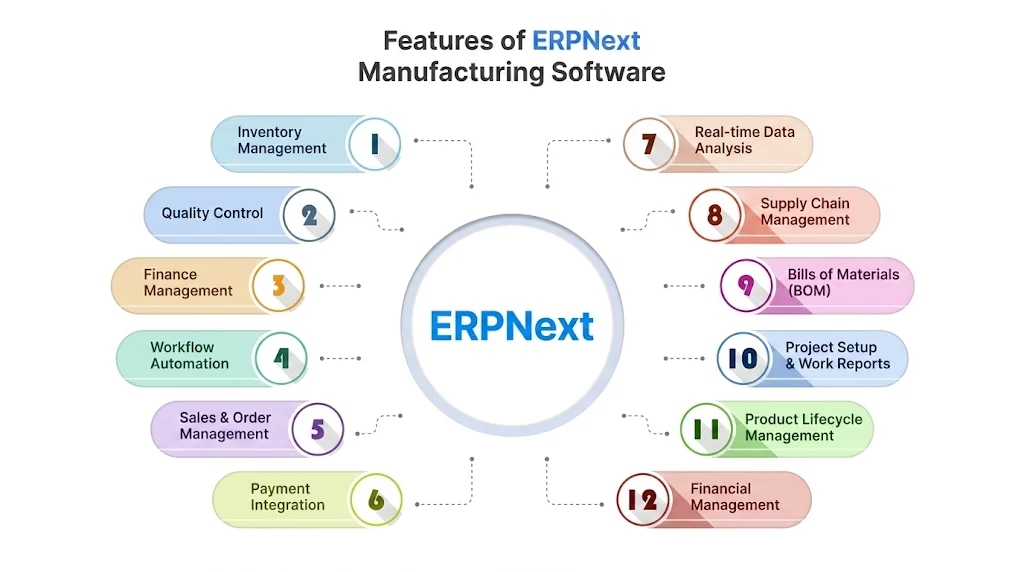
Out of the box you get: accounting (double-entry, multi-currency, GST/VAT compliant), inventory (multi-warehouse, batch/serial, perpetual valuation), manufacturing (BOM, work orders, capacity), CRM, HR + payroll, projects, assets, helpdesk, point-of-sale. They're all real modules, not screens that say "coming soon."
Where it genuinely competes with SAP B1 and Dynamics
- Total cost over five years is roughly 20-30% of SAP B1 for the same scope, mostly because there are no per-user license fees.
- Customization speed. Adding a new DocType (table + form + permissions + report) is a fifteen-minute task in the UI. The same change in SAP is a weeks-long SDK exercise.
- Reports are not a separate product. Query Reports and Report Builder live inside the same app. No Crystal Reports licenses, no "BI add-on."
- Mobile is usable. The same web app works on phones for stock entries, leave applications, and approvals.
Where it falls short
We are honest with clients about these:
- Heavy localization edge cases. India GST is excellent. EU VAT MOSS, complex Brazilian tax, and US sales-tax-by-zip-code need additional apps or custom work.
- Ecosystem depth. SAP has a partner doing literally anything you need. ERPNext has a smaller, scrappier community. Some niches are bare.
- Performance at scale. Past ~200 concurrent active users on a single bench, you start tuning Redis, MariaDB, and worker counts seriously. Doable, but not free.
- The default UI density assumes the user knows ERP vocabulary. Onboarding non-finance staff takes effort.
Deployment pattern we use
The official bench tool is great for development. For production we run a more boring setup:
- Docker images: the official
frappe/erpnext-worker+frappe/erpnext-nginximages, pinned to specific versions. - Postgres or MariaDB managed: we use the cloud provider's managed DB (AWS RDS, DigitalOcean Managed). Backups, point-in-time recovery, and version upgrades become someone else's problem.
- Redis managed: same logic. ERPNext uses Redis for cache, queue, and socketio; cheap to outsource.
- Object storage for files: S3 / Spaces via the
frappe-s3-attachmentapp. The localsites/directory becomes ephemeral. - One bench per environment: separate dev/staging/prod benches, never a "single bench with multiple sites" in production.
The customization rule we never break
ERPNext lets you customize in two ways: Customize Form in the UI (stored in the database), or a custom app (code in Git). The temptation is to do everything in the UI because it is faster. Do not.
UI customizations cannot be reviewed, cannot be diffed, cannot be migrated cleanly, and cannot be rolled back. Eighteen months in, you have a production database nobody understands.
Our rule: anything beyond a label change goes into a custom app, whether that's DocType extensions, server scripts, client scripts, or custom reports. The custom app sits in Git, gets reviewed via PRs, and ships through CI to all environments.
Integration patterns
ERPNext does not sit alone. The three integration shapes we ship most often:
- REST API + webhook for real-time syncs (e-commerce orders → Sales Orders, payment-gateway events → Payment Entries).
- Server scripts on document events (
on_submit,on_cancel) for the "when this happens, update that" logic that used to live in PL/SQL triggers. - Scheduled jobs for nightly reconciliations: exchange-rate pulls, stock revaluation, dunning runs.
The honest mid-market verdict
If the business is between 10 and 500 users, mostly on standard processes, and led by someone who understands the implementation will take real effort regardless of the vendor, ERPNext beats SAP B1 and Dynamics on TCO, customization speed, and developer experience. If the business is over 500 users, in a heavily regulated industry, or wants a software vendor to point at when something breaks, buy SAP and budget for it.
Where to start
- Read the documentation. Frappe and ERPNext docs are unusually good for an open-source project of this size.
- Stand up a free Frappe Cloud trial before you self-host. It lets you evaluate fit without infra distractions.
- Implement one module end-to-end (we usually start with Sales + Accounting). Resist the temptation to roll out everything in parallel.
- Plan for a one-time data migration with proper deduplication. Garbage-in-ERP is forever.
Frequently asked questions
What is ERPNext?
An open-source ERP built on the Frappe Framework. Out of the box: double-entry multi-currency accounting, multi-warehouse inventory, manufacturing, CRM, HR and payroll, projects, assets, helpdesk and POS — real modules, not placeholders.
Is ERPNext free?
The software is genuinely free under GPL v3, with no paid edition and no feature gating — unlike open-core products where the features mid-market companies need sit behind a licence. What is not free: hosting ($50–$500 a month), implementation ($15k–$80k for a mid-market rollout covering configuration, data migration, integrations and training), and support if you do not have the skills in house. ERPNext removes the licence line from your budget, not the ERP line. The full comparison is in ERPNext vs Odoo.
Is ERPNext a real alternative to SAP B1 or Dynamics?
For 10–500 users on mostly standard processes, yes: roughly 20–30% of SAP B1's five-year cost for the same scope, much faster customization, reporting built in. Over 500 users, heavily regulated, or you want a big vendor to point at — buy SAP and budget for it.
Can you integrate AI with ERPNext?
Yes — the REST API, webhooks and document events make ERPNext one of the friendlier ERPs to put AI in front of: assistants that look up stock, orders and invoice ageing through an MCP server, document automation that drafts entries from incoming invoices, AI-generated reports from live data. Writes always sit behind human approval.
Should we customize in the UI or a custom app?
Anything beyond a label change goes into a custom app in Git. UI customizations cannot be reviewed, diffed, migrated or rolled back — eighteen months in, you have a production database nobody understands.
Where does ERPNext fall short?
Localization edge cases outside India GST, a smaller partner ecosystem than SAP, serious tuning needed past ~200 concurrent users on one bench, and a UI density that assumes ERP vocabulary.